
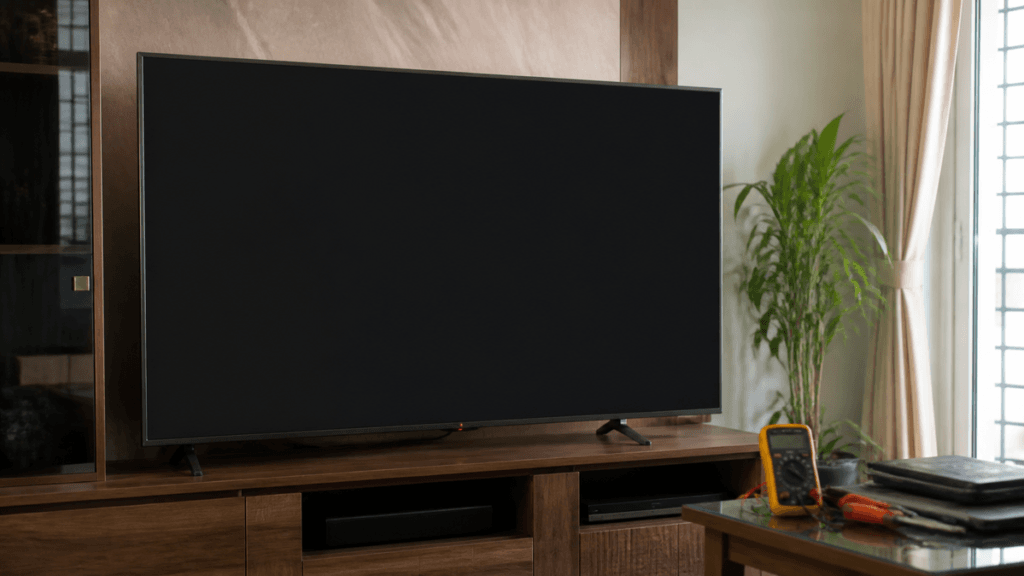
You switch on your LG TV, the standby light comes on, and perhaps you can hear the sound — but the screen stays black. It is frustrating, especially when you were ready to watch your favourite programme. Before assuming that your television needs an expensive repair, it helps to understand what might be causing the problem.
An LG TV black screen can be linked to an incorrect input, a connected device, a software issue or a fault inside the television. On LED and LCD models, the backlight is one possible cause when sound works but the picture is very faint. OLED televisions work differently, so the checks are not exactly the same.
At Wisdom Electronics & Computers, we help customers understand television faults and the repair options available. In this guide, you will learn which checks you can safely try at home, how the flashlight test works, what different LG models may require and how much common repairs can cost in Pune and Pimpri-Chinchwad.
Quick Answer
If your LG TV turns on but the screen stays black, check the power connection, selected input, HDMI cable and connected devices first. If the TV produces sound but the picture is very faint, a backlight problem is one possibility on LED/LCD models. A faulty power supply, main board, display-control circuit or software issue can also cause a black screen. OLED TVs do not use a conventional LED backlight, so they require a different diagnostic approach. If the basic checks do not help, arrange a technical assessment before replacing any parts.
- Why Does My LG TV Have a Black Screen?
- How to Perform the Flashlight Test on an LG TV
- LG TV Black Screen Fixes to Try at Home
- How to Tell Whether the Problem Is With the TV or a Connected Device
- LG TV Black Screen Repair Cost in Pune
- Why a Technician Should Confirm the Fault First
- What Information Should You Share When Booking an LG TV Inspection?
- What Happens During a Professional TV Repair Visit?
- LG TV Black Screen Repair in Pune and Pimpri-Chinchwad
- Common LG TV Black Screen Problems
- Frequently Asked Questions About LG TV Black Screen Problems
Why Does My LG TV Have a Black Screen?
A black screen does not always mean the display panel has failed. Sometimes the problem is outside the television, such as an HDMI connection or a set-top box that is not sending a picture. In other cases, the TV may have a software problem or a fault in one of its internal components.
Watch what the set does as it starts: note whether audio plays, the LG logo briefly appears, or the display stays dark with only a faint image. These observations may help point towards the cause.
1. LED Backlight Failure — A Common Possibility
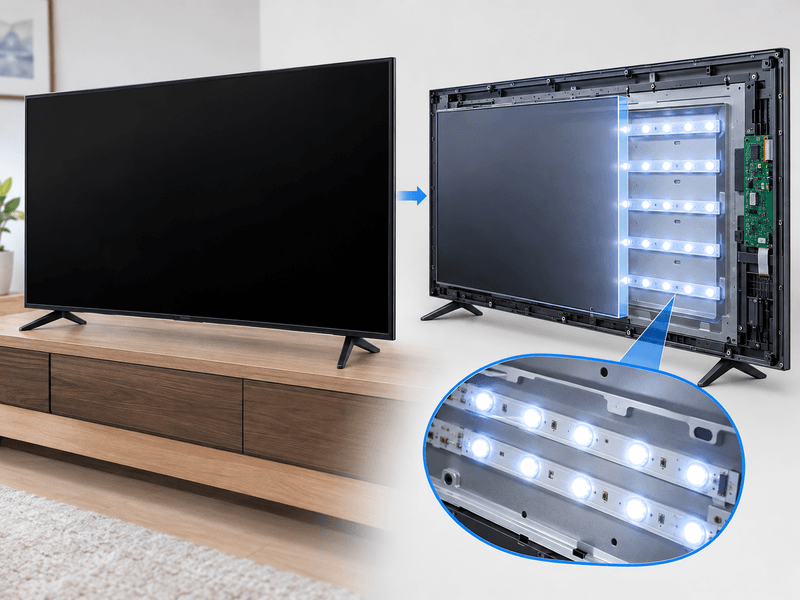
Many LG LED/LCD televisions use LED strips behind the screen to illuminate the picture. If the backlight stops working properly, the television may still produce sound while the screen looks dark.
In some cases, you may notice a faint picture when you shine a torch across the screen. The TV may also show a picture for a short time before the display becomes dark.
These symptoms can point towards the backlight system, but they do not confirm that the LED strips themselves have failed. The backlight power supply and related circuits may also need checking.
Estimated repair cost: ₹2,000–₹6,000.
The final cost depends on the LG model, screen size, backlight design, parts required and labour.
2. Power Supply Board Problems
The power supply board distributes electrical power to different parts of the television. If it develops a fault, the TV may not start properly, may switch off unexpectedly or may turn on without displaying a picture.
You might notice that the standby light behaves differently from usual or that the television repeatedly tries to start. These signs can help a technician decide what to test.
A power-related symptom does not automatically mean the power supply board needs replacing. The fault needs to be identified before a repair is recommended.
Estimated repair cost: ₹1,500–₹4,000.
3. Main Board Failure
The main board controls important television functions, including video processing and communication between internal components. A problem with the board can sometimes leave the screen black even when the television appears to switch on.
Other possible signs include missing menus, unusual startup behaviour, repeated restarting or problems affecting several functions.
The same symptoms can occur for other reasons, so a main board replacement should not be recommended based on the black screen alone.
Estimated repair cost: ₹5,000–₹8,000.
The cost depends on the model, the extent of the fault and whether the board can be repaired or needs replacement.
4. T-Con or Display-Control Circuit Fault
Some LCD televisions use a timing-control board, commonly called a T-Con, to help deliver image data to the display. A fault in this board or its connections can affect the picture.
The internal design varies between LG models. Not every television has a separate T-Con board that can be replaced independently, so the model number matters when assessing the repair.
Estimated repair cost, where applicable: ₹2,500–₹6,000.
5. HDMI or Input Source Problems
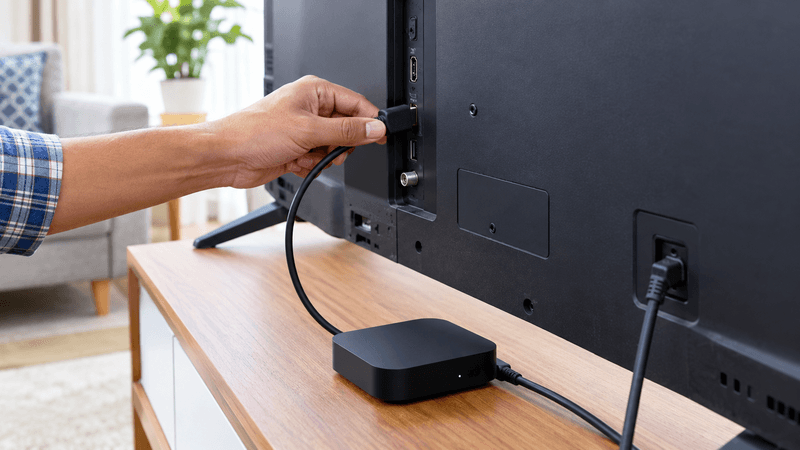
Sometimes the television is working normally, but the selected input is not sending a picture. This can happen with a set-top box, gaming console, streaming stick or other connected device.
Before assuming that the TV has an internal fault, try the following:
- Use the remote’s source/input control to open the list of available inputs.
- Select the HDMI input or source you normally use.
- Check that the connected device is switched on.
- If possible, test with a different HDMI lead.
- Disconnect the external device and see whether the TV’s home menu appears.
If the home screen works but one connected device does not show a picture, start by checking that device and its cable.
6. Software or Firmware Problems
A software issue can sometimes prevent a Smart TV from starting correctly. You may notice the problem after an update, an unexpected shutdown or a temporary system glitch.
A basic power restart may help if the issue is temporary. If the screen remains black, repeated resets are unlikely to solve a hardware fault.
If the problem began immediately after a software update, tell the technician when you arrange an inspection.
How to Perform the Flashlight Test on an LG TV
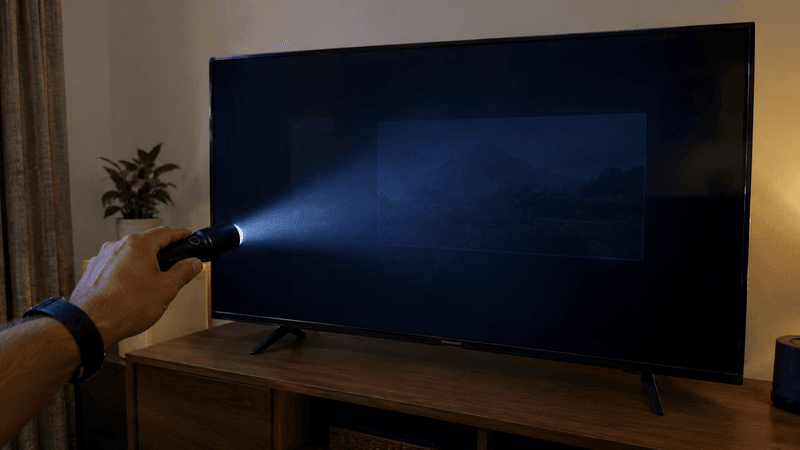
The flashlight test can provide a useful clue on some LED/LCD televisions.
Follow these steps:
- Switch on the television.
- Dim the lights in the room.
- Take a torch and shine it across the screen from a short distance.
- Look carefully for a faint outline of the LG logo, home menu or picture.
- Avoid pressing the torch against the display.
If you can see a faint image, the backlight system may not be illuminating the screen properly. The backlight power supply or related circuitry could also be involved, so the test does not identify the exact faulty part.
If you cannot see a picture, it does not automatically mean the display panel has failed.
Does the Flashlight Test Work on LG OLED TVs?
Not in the same way. OLED televisions produce light through their individual pixels and do not use a conventional LED backlight. A flashlight test designed to reveal a faint image on an LED/LCD television is not a reliable way to diagnose an OLED black screen.
Do not remove the back cover to investigate the fault yourself. If the screen stays black after the basic checks, a technician can assess the television using suitable testing methods.
LG TV Black Screen Fixes to Try at Home
Try a few checks that do not require opening the cabinet before arranging service; they may reveal an input, connection or settings issue.
Check the Power Connection
Make sure the TV’s power plug is properly connected and the wall socket is working. If you use an extension board or surge protector, check it for visible damage.
Avoid using a frayed lead or an unreliable wall outlet. Stop using the TV if you detect a burning smell, unusual warmth or other signs of electrical damage.
Restart the Television
Turn the set off, remove the plug from the socket for around 60 seconds, then reconnect the power and start it again.
This can clear a temporary software or power-state glitch. It will not repair a failed internal component, so do not keep repeating the process if the problem continues.
Check the Standby Light
Look at the indicator light when you switch the television on. Is it steady, blinking or completely off?
Status-light patterns differ across LG models, so they cannot be used as a universal fault code. Tell the technician whether the indicator is steady, flashing or off.
Try the Physical Power Button
If the remote is not responding, try the television’s physical power button. Depending on the model, it may be underneath the TV or on the rear.
If the TV responds to the physical button, check the remote batteries and make sure the remote is working properly.
Disconnect External Devices
Switch off the television and disconnect HDMI devices, set-top boxes, consoles, streaming sticks and USB accessories.
Start the TV with the accessories disconnected. If its home menu returns, attach each device separately to see whether a particular accessory or connection brings the problem back.
Select the Correct Input
Use the remote to switch between the available inputs. If the home menu appears but one HDMI source remains black, check the connected device and cable first.
A working home menu is a useful clue that the television can display at least some on-screen information.
Notice Whether Sound or a Logo Appears
Listen for sound and check whether the LG logo appears before the screen goes dark. Notice whether the screen flashes or the standby light changes.
You only need to describe what you have observed; the technician can use those details to decide what to test.
How to Tell Whether the Problem Is With the TV or a Connected Device
A blank screen can come from the television, a set-top box, an HDMI cable, a console or a streaming device.
If the LG menu is visible, inspect the chosen source and attached equipment first. Where possible, test a different HDMI port or a known-working lead.
If the home menu also remains missing, the television may need further testing. A black screen across different sources can help narrow down the possibilities, but it still does not prove that a particular component has failed.
Change one thing at a time when checking cables and devices. That way, you can see whether the picture returns after a particular step.
Important Safety Precautions
You can check external connections and settings at home, but leave internal electrical repairs to a qualified technician. Parts inside a television can retain a dangerous electrical charge even after it has been unplugged.
Keep these simple precautions in mind:
- Unplug the TV before moving or checking external cables.
- Do not remove the rear cover or attempt to test internal boards.
- Do not press, tap or push the display to bring the picture back.
- Keep liquids and cleaning sprays away from the screen edges and vents.
- If you notice a burning smell, unusual electrical sounds, excessive heat or visible damage, disconnect the power if it is safe to do so and arrange an inspection.
Does the Repair Depend on Your LG TV Model?
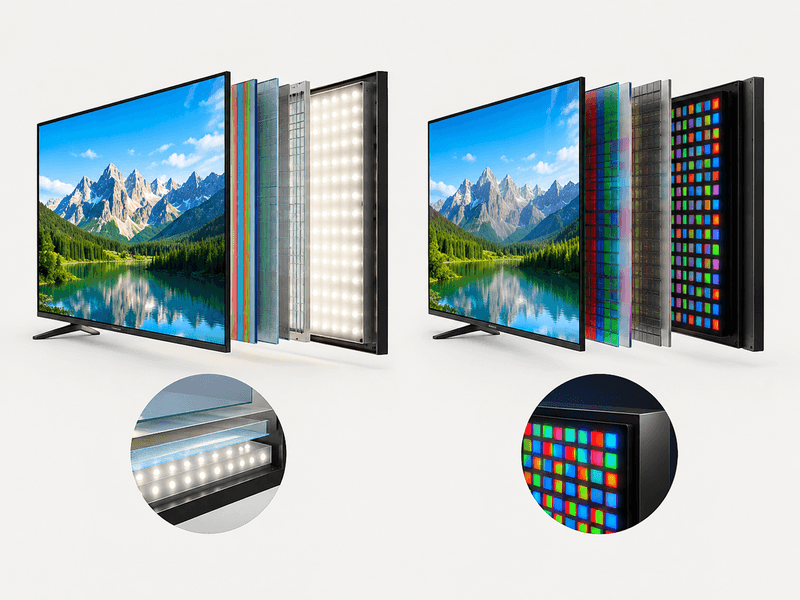
Yes. LG makes LED/LCD, NanoCell, QNED and OLED televisions, and the display technology affects which components may be involved.
The full model number is more useful than screen size alone when assessing a black-screen problem. You can often find it on the product label at the rear of the TV. If the menu still appears, the model information may also be available in Settings.
LG LED and LCD TVs
Many LED/LCD models use a backlight system to illuminate the picture. If the screen is dark but sound continues, the backlight is one possible area to investigate.
The power supply, main board, display connections or panel may also be involved. Testing is needed to determine the actual cause.
LG NanoCell and QNED TVs
NanoCell and QNED sets use LCD panels combined with additional picture-enhancement technologies. Depending on the model, a blank display may relate to the illumination system, power supply, main board or screen assembly.
The product name alone cannot identify the faulty component. The model number and test results help determine the appropriate repair.
LG OLED TVs
OLED televisions do not use a conventional LED backlight. Their pixels produce their own light, so the diagnostic process differs from that used for LED/LCD televisions.
A black screen on an LG OLED model can involve power, control electronics, software or the display panel. A technician should assess the particular model rather than assuming that a backlight repair is required.
LG TV Black Screen Repair Cost in Pune
The cost of repairing an LG TV with a black screen depends on the cause of the problem, the model and the parts required. The following table provides estimated prices and repair times.
| Repair Type | Estimated Cost | Estimated Time |
| LED Backlight Repair | ₹2,000–₹6,000 | 2–4 hours |
| T-Con Board Repair or Replacement | ₹2,500–₹6,000 | 1–2 hours |
| Main Board Repair or Replacement | ₹5,000–₹8,000 | 2–5 hours |
| Power Supply Repair | ₹1,500–₹4,000 | 1–3 hours |
| Software or Settings Issue | ₹0–₹1,500 | 30–60 minutes |
These prices are estimates, not fixed quotations. The actual cost and repair time may vary depending on the LG TV model, fault diagnosis, parts availability and the work required. A technician can provide a more accurate estimate after checking the television.
Why a Technician Should Confirm the Fault First
Different faults can produce very similar symptoms. A black screen with sound does not automatically mean the backlight has failed, and a television that will not show its home menu does not automatically need a new panel.
Replacing a component without proper testing can lead to unnecessary expense. A careful assessment should identify the likely fault, explain the repair options and provide an estimate before work begins.
At Wisdom Electronics & Computers, our founder brings 17 years of experience from working at a Sony Authorised Service Centre. This background contributes to our technical experience, while each LG television still needs to be assessed according to its own model and design.
The aim is to understand the fault before recommending a repair, rather than replacing parts based on guesswork.
Should You Repair an LG TV With a Black Screen or Replace It?
The right decision depends on the television’s age, condition, model, fault and estimated repair cost.
A black screen does not automatically mean that the panel needs replacing. The issue could be a connected device, a software problem, the power supply, the backlight system on an LED/LCD model, the main board or another component.
Before deciding, ask what has been tested, which component is suspected and whether the estimate includes parts and labour. Compare the confirmed repair cost with the price of a similar replacement television.
Repair May Be Worth Considering When
- The fault is limited to a repairable board, connection, setting or backlight system.
- The television is otherwise in good condition.
- The repair cost is reasonable compared with a similar replacement.
- The technician can explain the work and any applicable warranty.
Replacement May Be Worth Comparing When
- The display panel is damaged and the repair estimate is close to the cost of a replacement.
- The television has several faults or has needed repeated repairs.
- The required part is unavailable or too expensive to source.
- A replacement would offer better value for your household.
There is no single age or price rule that suits every LG model. Get the fault assessed and compare the estimate before making your decision.
What Information Should You Share When Booking an LG TV Inspection?
You do not need to know what has failed before contacting a technician. A few simple details can help the team understand what is happening and prepare for the visit.
If possible, share:
- The full LG model number.
- The approximate screen size and age of the television.
- Whether sound is present while the screen stays black.
- Whether the standby light is on, blinking or off.
- Whether the LG logo appears briefly or the screen flashes before going dark.
- Whether the problem started after a power cut, software update or change of connection.
- Whether the screen has visible cracks, impact marks or liquid damage.
- Your locality in Pune or Pimpri-Chinchwad and a convenient time to contact you.
You can usually find the model number on the product label at the rear of the TV without opening the cabinet. If the menu still works, you may also find the details in Settings.
If you do not know the model number, that is fine. Start by describing the symptoms and share the model details later if you can find them. Never share passwords or account sign-in details when arranging a repair.
What Happens During a Professional TV Repair Visit?
Knowing the usual stages of a service visit can help you prepare for the appointment.
1. Understanding the Symptoms
The technician asks about the black screen, sound, standby light and any recent changes. These details help guide the initial checks.
2. Checking External Connections
The power connection, selected input, connected devices and visible signs of damage are checked where appropriate.
3. Technical Diagnosis
If the external checks do not explain the issue, internal components may need to be inspected and tested using suitable equipment.
4. Explaining the Estimate
The technician should explain the suspected fault, proposed repair and expected cost before you approve the work.
5. Repair and Testing
If you approve the repair and the required parts are available, the work can proceed. The television should then be tested against the problem you reported.
6. Understanding the Warranty
Ask which warranty, if any, applies to the repair and replacement parts. Keep the details for your records.
Why Choose Wisdom Electronics for LG TV Repair?
When an LG screen goes dark, the cause should be established before any parts are changed. Wisdom Electronics & Computers helps TV owners in Pune and Pimpri-Chinchwad with repair enquiries.
Experience with TV faults
Our founder brings 17 years of experience from working at a Sony Authorised Service Centre. This technical background helps us approach TV faults methodically and assess the symptoms before recommending a repair.
Diagnosis before repair
A black screen can be linked to the backlight, power supply, main board, display circuitry or software. We check the symptoms and diagnose the fault before explaining the available repair options and estimated cost.
Service across Pune and PCMC
We serve customers in areas including Wakad, Chinchwad, Kalewadi, Hinjewadi, Baner, Ravet, Nigdi, Pimple Saudagar, Akurdi and nearby areas of Pune and Pimpri-Chinchwad.
Clear repair estimates
Before proceeding with a repair, we explain the likely work and its estimated cost. The final amount depends on the confirmed fault, TV model and parts required.
Contact Wisdom Electronics
For an LG TV black screen issue, call us on +91 9765536767 or send your TV model number and a description of the problem on WhatsApp.
Website: https://www.wisdomelectronics.com
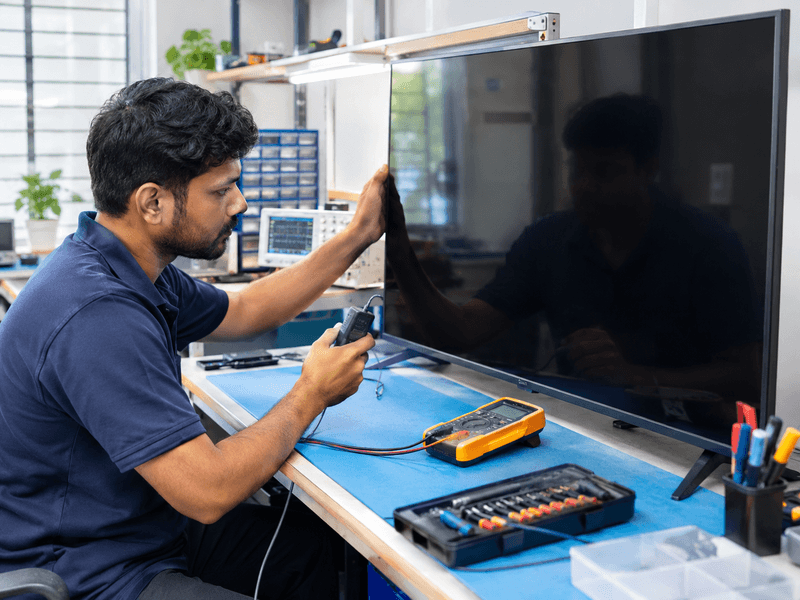
LG TV Black Screen Repair in Pune and Pimpri-Chinchwad
Wisdom Electronics & Computers provides LG TV repair assistance across Pune and Pimpri-Chinchwad, subject to service coverage for your location.
If your LG TV has sound but no picture, shows a blank screen at startup or turns on without displaying the home menu, contact us with the model number and a short description of the problem. We can discuss the symptoms and explain the next step.
Our service areas include:
- Wakad
- Baner
- Hinjewadi
- Ravet
- Nigdi
- Chinchwad
- Kalewadi
- Pimple Saudagar
- Akurdi
- Moshi
- Chikhali
- Pimple Nilakh
- Sangvi
- Bhosari
- Aundh
Not sure if we cover your area? Send your locality on WhatsApp and we’ll confirm.
LG TV repair service page: https://wisdomelectronics.com/lg-tv-repair-in-pune-same-day-doorstep-service/
Website: https://www.wisdomelectronics.com
Phone: +91 9765536767
WhatsApp: https://wa.me/919765536767
Common LG TV Black Screen Problems
LG TVs can develop a black screen for different reasons. The symptoms can help narrow down the possible cause, but proper diagnosis is needed before deciding which component requires repair.
LG TV Has Sound but No Picture
If your LG TV produces sound but the screen remains black, a backlight fault is one possible cause on LED and LCD models. A faint image visible during a flashlight test can provide a useful clue. Other faults may produce similar symptoms, so the test alone cannot confirm the exact repair.
LG Smart TV Screen Goes Black After an Update
If the display problem begins after a software update, check the TV’s power supply, restart it and review the available settings. Software may be involved, but a black screen after an update does not automatically mean the software is responsible.
LG 4K TV Suddenly Displays a Black Screen
A sudden loss of picture can be associated with power supply, main board or display-related faults. The correct diagnosis depends on the model and the symptoms. Avoid replacing the T-Con board or another component without confirming that it is responsible.
If the screen stays black after basic checks, arrange a professional inspection to identify the fault and understand the repair options.
Frequently Asked Questions About LG TV Black Screen Problems
This can happen because of an LED/LCD backlight issue, a power or control-circuit fault, a display connection problem, the selected source or another internal defect. Audio by itself does not identify the failed part.
You can safely check the power socket, cables, input selection and connected devices, then try a basic power restart. Do not open the TV or attempt internal electrical repairs.
Disconnecting the power for about one minute may clear a temporary glitch. If the screen stays black after reconnecting it, further checks may be needed.
No. External devices, settings, software and several internal components can cause similar symptoms. The panel should not be blamed without testing.
OLED televisions do not use a conventional LED backlight. A black screen on an OLED model needs a different diagnostic approach.
The cost depends on the model and confirmed fault. Settings-related work may cost less than board or backlight repairs, while panel-related work can be expensive. Ask for an estimate after diagnosis.
Same-day service depends on the locality, technician availability, nature of the fault and whether the required parts are available. Confirm the timing when booking.
Avoid repeated attempts if you notice a burning smell, unusual sound, excessive heat or visible damage. Disconnect the power if safe and arrange an inspection.
Note whether sound continues, whether the LG logo appears and whether the standby light changes. Share these details with the technician so the checks can be focused.
A power event may be relevant, but it does not prove that a particular board has failed. Mention when the problem started and arrange testing if basic external checks do not help.
People Also Ask: LG TV Black Screen
The television may receive power without producing a visible image. Begin by checking the selected input and connected equipment. If the menu remains unavailable, further testing specific to the model may be needed.
If the TV is unresponsive, try disconnecting the power for about one minute and reconnecting it. Menu-based resets require a visible menu, and button combinations vary by model. Avoid unverified reset sequences.
A faint image under a torch can suggest a backlight issue on some LED/LCD TVs, but it is not a definitive test. The method does not apply in the same way to OLED TVs.
It depends on the confirmed fault, part availability, age and repair estimate. Compare the estimate with the price of a similar replacement before deciding.
A power event may be connected to the issue, but other causes are possible. Avoid opening the television and arrange testing if the basic external checks do not help.
Ask Wisdom Electronics & Computers whether your address is covered and describe the symptoms you are seeing.
Phone: +91 9765536767
Website: https://www.wisdomelectronics.com
Final Note
An LG TV black screen is a symptom, not a diagnosis. Start by checking the external connections and input, note the model number and observe what happens when you switch the television on. Avoid replacing parts based on guesswork.
A clear diagnosis and estimate can help you decide whether repair is the practical option for your LG television.
Need help with your LG TV? Call Wisdom Electronics & Computers on +91 9765536767 or message us on WhatsApp: https://wa.me/919765536767